Your chess.com board in OBS. One click. Always cropped, always square.
Free · open source · no account · works with OBS 28+
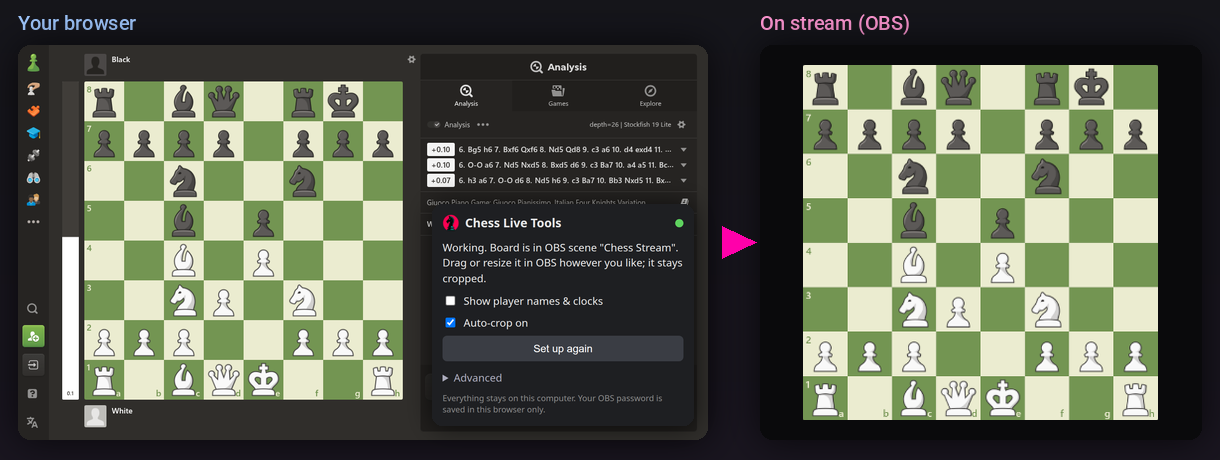
Set up in 3 steps#
- Install it. Chrome / Edge / Brave: extract the zip, open
chrome://extensions, turn on Developer mode, click Load unpacked and pick the folder. Firefox: openabout:debugging#/runtime/this-firefoxand load the zip. - Connect OBS. In OBS: Tools → WebSocket Server Settings, tick Enable, click Show Connect Info, copy the password. Paste it into the extension.
- Click Set up on any chess.com game. Done. Drag and resize the board in OBS however you like.
Store versions (one-click install, automatic updates) are coming soon.
Get new streamer tools first
One email when something new ships. Plus a free link to the chesstok member tools. No spam.
More details#
OBS isn't capturing my browser yet
The extension offers Add browser capture to OBS. Click it and pick your browser window, not your entire screen. A whole-screen capture would also show any window you move in front of the browser, so the extension won't use one. During setup you may see two small pink squares flash in the page corners for a second: that's how it finds your browser in OBS.
Troubleshooting
| Popup says | Do this |
|---|---|
| Can’t reach OBS | Open OBS and enable Tools → WebSocket Server Settings. |
| That password didn’t work | Copy the password again from Show Connect Info. |
| Open chess.com… | Open a game or the Play page. Already open? Reload the tab once. |
| …captures your whole screen… | Click Add browser capture to OBS and pick the Window tab. |
| Scroll so the whole board is visible | The whole board must be on screen. |
Sharper board on stream
The stream can't be sharper than the board on your screen, so make the board big on chess.com (Ctrl + or drag its corner). In OBS, right-click the board and choose Scale Filtering → Lanczos.
Advanced: optional FSR 1 upscaling shaders for when your screen board is smaller than your stream board. Download the shaders, install the obs-shaderfilter plugin, put your capture in a scene named Board HQ at 0,0 with no bounds, add board-easu.shader (named Board EASU) and board-rcas.shader as User-defined shaders on that scene with your stream board size as target_size, then enter Board HQ under Advanced in the extension and click Set up again.
Works with
OBS Studio 28 or newer. Tested on Linux with Chrome, Firefox and LibreWolf. Built for Windows and macOS too, using OBS's standard Window Capture / macOS Screen Capture; testing there is in progress, so please report anything that's off.
Privacy
Everything stays on your computer. The extension only talks to OBS on 127.0.0.1 / localhost, only measures where the board is on chess.com, and sends nothing anywhere. No analytics, no accounts. Full privacy policy.
Not affiliated with chess.com or the OBS Project.